More browsing paths
Play Rig Attack (Aftermarket / Homebrew · World edition · English) Online
Rig Attack
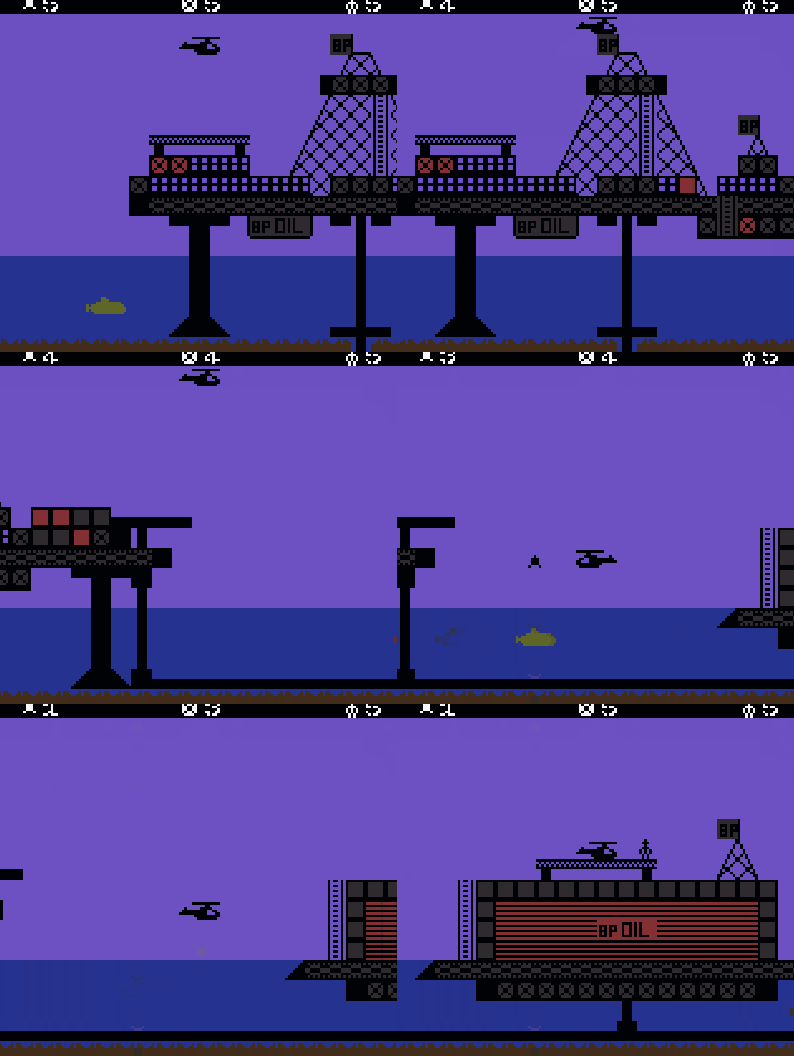
Play Rig Attack online on Game Boy Color. Patrol the oil fields in a helicopter in Rig Attack. Take off from a rig's helipad, watch fuel and bombs and intercept enemy submarines before their attacks threaten the platform, returning to a pad for supplies.
Browser play
Game Boy Color (GBC) — EmulatorJS controls
Default Player 1 keyboard mapping. Change keys in Controller Settings.
| Console button | Keyboard |
|---|---|
| ↑ / ↓ / ← / → | ↑ / ↓ / ← / → |
| A / B | Z / X |
| START / SELECT | Enter / V |
Open Controller Settings to configure your keyboard or gamepad. Touch controls are available on mobile.
How to Play Rig Attack
Quick start
Press START, lift off with the D-pad and practise A bombing. Make a short patrol and land on a helipad to learn refuelling.
Controls
START begins, D-pad flies the helicopter and A drops bombs. Land on a helipad for fuel and bombs; avoid enemy fire and return before fuel runs out.
Rig Attack — About this game
Begin with a short flight near the starting rig and learn how A drops a bomb below the helicopter. Fly above a submarine while avoiding its fire, then return before fuel runs low. Landing on a helipad replenishes fuel and bombs, so plan the patrol around a safe return rather than staying out indefinitely.
Cheats
No cheats have been added for this edition.
Player verification and sources
Browser play was reviewed before this edition was published in the catalogue. The date below is the catalogue publication date, not the game’s original release date.
- Browser test and catalogue publication date
- Browsers and devices
- PC: Chrome, Edge and Firefox. Mobile: Chrome on Android and Safari on iPhone and iPad.
- Player engine and core
- EmulatorJS 4.3.0-pre · gb
- Tested by
- rwEmulator
Sources and editorial basis
rwEmulator reviews edition metadata, release information, game manuals and first-hand browser-play notes. Available manuals are linked below; the editorial policy explains how facts are checked and corrections are handled.