More browsing paths
Play Ripple Island (Japan edition · Japanese) Online
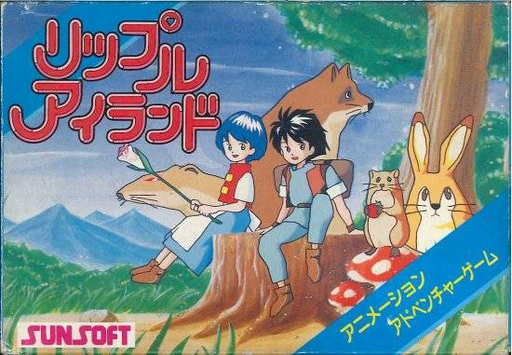
Ripple Island
Play NES ``Ripple Island'' online. Go on a mystery-solving journey between the boy Kyle and the island's residents. Guides you through nine commands, cursor exploration, how to use items, and passwords.
Browser play
Nintendo Entertainment System (NES) / Famicom — EmulatorJS controls
Default Player 1 keyboard mapping. Change keys in Controller Settings.
| Console button | Keyboard |
|---|---|
| ↑ / ↓ / ← / → | ↑ / ↓ / ← / → |
| A / B | Z / X |
| START / SELECT | Enter / V |
Open Controller Settings to configure your keyboard or gamepad. Touch controls are available on mobile.
How to Play Ripple Island
Quick start
Press START on the title screen to depart. Use the left and right arrow keys to select "Mil Silabelle", press A to select, then move the cursor to examine the area of interest. If there are any residents, gather information in ``Hanas'' and obtain the items found in ``Toru.'' When you select "Ido", a movement arrow will appear, so press the cross key in the direction you want to move. If you get stuck, change the search position or command, and try talking to the same person again. Be sure to write down your password before suspending the service.
Controls
START: Start at the title screen. D-pad left and right: Command selection. A: Decide, send text, specify target. B: Cancel and return to command selection. Use the cross keys to select the cursor or item, and press A to confirm. In "Idou", move with the cross key according to the displayed arrow. On the password screen, use left and right to change the position, A/B to change the characters, and START to confirm. Don't use SELECT.
Ripple Island — About this game
"Ripple Island" is a command-selected adventure set on an island rich in nature, where a young boy named Kyle goes on an adventure. Kyle sets out on a journey to defeat Emperor Geloger who kidnapped Princess Nasarel, dreaming of a reward. Players pick up clues from the scenery and conversations and combine nine types of actions, including ``Mil Silabelle,'' ``Toru,'' ``Os,'' and ``Hiku,'' to open a path. You can specify the location to investigate with the cursor, and discoveries are hidden even in seemingly empty scenery. If you change the situation and talk to someone you have already spoken to, you may be able to obtain new information. Inventory items are used in the area where they are obtained, so try to connect the items you have with the surroundings. The characters and unique animals you meet on your travels will also add color to your adventure.
Cheats
No cheats have been added for this edition.
Player verification and sources
Browser play was reviewed before this edition was published in the catalogue. The date below is the catalogue publication date, not the game’s original release date.
- Browser test and catalogue publication date
- Browsers and devices
- PC: Chrome, Edge and Firefox. Mobile: Chrome on Android and Safari on iPhone and iPad.
- Player engine and core
- EmulatorJS 4.3.0-pre · nes
- Tested by
- rwEmulator
Sources and editorial basis
rwEmulator reviews edition metadata, release information, game manuals and first-hand browser-play notes. Available manuals are linked below; the editorial policy explains how facts are checked and corrections are handled.