More browsing paths
Play River King: Mystic Valley (US edition) Online
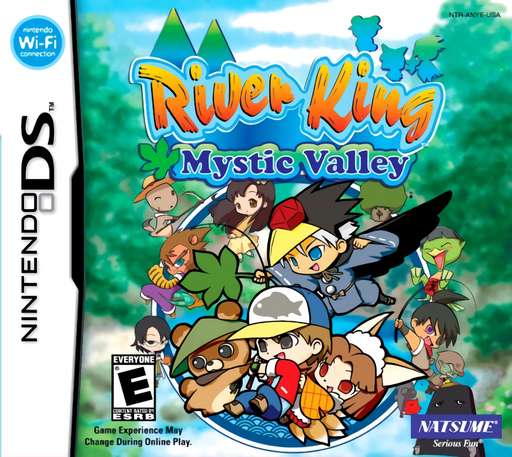
River King - Mystic Valley
Play River King: Mystic Valley online. Explore a magical valley and master touch fishing to find the legendary River King. See the Nintendo DS starting guide and controls.
Browser play
Nintendo DS (NDS) — EmulatorJS controls
Default Player 1 keyboard mapping. Change keys in Controller Settings.
| Console button | Keyboard |
|---|---|
| ↑ / ↓ / ← / → | ↑ / ↓ / ← / → |
| A / B / X / Y | Z / X / A / S |
| L / R | Q / E |
| START / SELECT | Enter / V |
| Microphone | Not assigned |
Open Controller Settings to configure your keyboard or gamepad. Touch controls are available on mobile.
How to Play River King: Mystic Valley
Quick start
Equip a rod and bait, find a fish shadow and cast nearby. Wait for the float to sink, hook the fish and practise circular reeling while checking the gauges.
Controls
Touch the casting location or use A; another early input shortens the cast. Tap or press A when the float sinks. Draw circles to reel and follow the upper-screen pull-direction prompt, balancing tension and stamina.
River King: Mystic Valley — About this game
A scale from the River King may wake your sleeping sister. Search the valley's fishing spots, improve your tackle and befriend creatures whose grown-up abilities open routes. Cast near a fish shadow without dropping the float so close that it scares the fish away. When the float sinks, set the hook and draw circles to reel. Watch line tension and energy, adjusting against the fish's pull instead of winding without pause. Begin with an easy catch and inspect both gauges. Feeding suitable fish to your companions supports their growth, while rest or food restores your own fishing stamina.
River King: Mystic Valley Game manuals
Cheats
No cheats have been added for this edition.
Player verification and sources
Browser play was reviewed before this edition was published in the catalogue. The date below is the catalogue publication date, not the game’s original release date.
- Browser test and catalogue publication date
- Browsers and devices
- PC: Chrome, Edge and Firefox. Mobile: Chrome on Android and Safari on iPhone and iPad.
- Player engine and core
- EmulatorJS 4.3.0-pre · nds
- Tested by
- rwEmulator
Sources and editorial basis
rwEmulator reviews edition metadata, release information, game manuals and first-hand browser-play notes. Available manuals are linked below; the editorial policy explains how facts are checked and corrections are handled.