More browsing paths
Play Rocket Power - Gettin' Air (US_EU edition · English) Online
Rocket Power - Gettin' Air
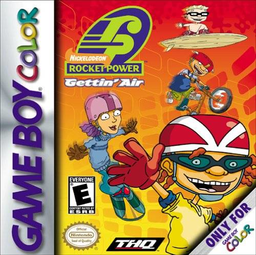
Play Rocket Power - Gettin' Air online on GBC. Rocket Power: Gettin' Air turns the animated gang's seaside playground into a collection of board and bike challenges.
Browser play
Game Boy Color (GBC) — EmulatorJS controls
Default Player 1 keyboard mapping. Change keys in Controller Settings.
| Console button | Keyboard |
|---|---|
| ↑ / ↓ / ← / → | ↑ / ↓ / ← / → |
| A / B | Z / X |
| START / SELECT | Enter / V |
Open Controller Settings to configure your keyboard or gamepad. Touch controls are available on mobile.
How to Play Rocket Power - Gettin' Air
Quick start
Press START at the title, highlight a new game and press START again. You begin as Reggie on the Boardwalk. Skate left or right, stop in front of a moving sign, board or bike and press A or B to get off. This takes you into the corresponding level. Check the zine for the next objective.
Controls
Menus use the D-pad to highlight and START to choose. On the Boardwalk, left/right skates and A or B gets off. In rollerblading, right starts skating, held right speeds up, left stops, up/down changes lanes and A or B jumps; up also enters a ramp. START pauses sports events. Use each sport's own trick combinations.
Rocket Power - Gettin' Air — About this game
The Boardwalk connects the action: stop beside moving signs, boards or bikes to discover an event. Skateboarding, snowboarding, surfing, rollerblading and BMX bring different surfaces and hazards, so speed alone will not clear every challenge. Read Reggie's zine to see what the gang needs and review the score after a level. Learn a clean jump and safe landing before combining tricks, and adjust your approach to each sport's course.
Rocket Power - Gettin' Air Game manuals
Cheats
No cheats have been added for this edition.
Player verification and sources
Browser play was reviewed before this edition was published in the catalogue. The date below is the catalogue publication date, not the game’s original release date.
- Browser test and catalogue publication date
- Browsers and devices
- PC: Chrome, Edge and Firefox. Mobile: Chrome on Android and Safari on iPhone and iPad.
- Player engine and core
- EmulatorJS 4.3.0-pre · gb
- Tested by
- rwEmulator
Sources and editorial basis
rwEmulator reviews edition metadata, release information, game manuals and first-hand browser-play notes. Available manuals are linked below; the editorial policy explains how facts are checked and corrections are handled.