More browsing paths
Play Sanrio Carnival 2 (Japan edition · Japanese) Online
Sanrio Carnival 2
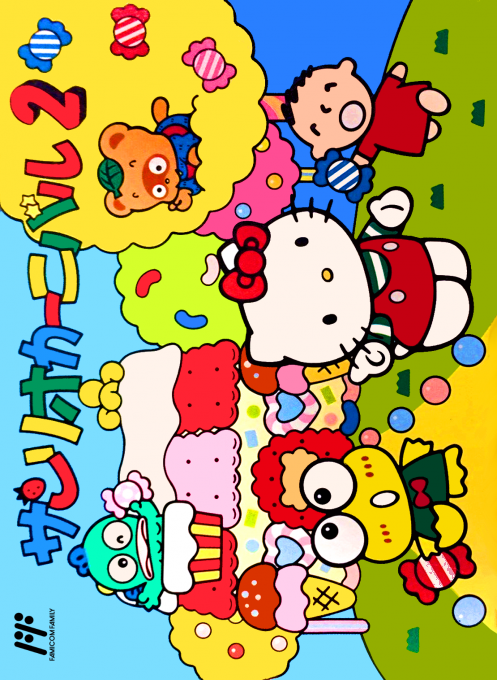
Play Sanrio Carnival 2 online. Use the strength of the hammer to line up the candies and challenge the goal of each color. You can enjoy 3 modes: stage, battle, and score attack.
Browser play
Nintendo Entertainment System (NES) / Famicom — EmulatorJS controls
Default Player 1 keyboard mapping. Change keys in Controller Settings.
| Console button | Keyboard |
|---|---|
| ↑ / ↓ / ← / → | ↑ / ↓ / ← / → |
| A / B | Z / X |
| START / SELECT | Enter / V |
Open Controller Settings to configure your keyboard or gamepad. Touch controls are available on mobile.
How to Play Sanrio Carnival 2
Quick start
First, let's practice the basics with "Stage". Move the character at the edge of the board up and down to match the row of candy you want to send. Use B's weak launch and A's strong launch, and arrange 3 or more of the same color vertically or horizontally. Check the progress of each color on the flower at the top, and prioritize the colors that are still missing. If you keep erasing filled colors, the board will become clogged.
Controls
In the candy scene, move the character up and down, hit A hard, hit B soft, and press START to pause. It is not a method of having the character walk left and right. In the bonus slide puzzle, use the direction keys to select the position, press A to move the pieces, and press START to check and pause the completed drawing. Candies disappear when there are 3 or more in the vertical and horizontal directions, and candies do not disappear diagonally.
Sanrio Carnival 2 — About this game
The mechanism has changed from the block rotation of the previous game, and you move the character at the edge of the board up and down, and hit the candy at the desired height to place it. In "Stage", if you erase the required number of all colors within the time limit, you will advance, and in between, slide puzzles will appear to complete the picture. If you add more colors that you have already erased, it will become a block that gets in the way, so it is important to look at the remaining colors and avoid bias. In ``Taisen,'' you push candies and bombs against the opponent, and in ``Chosen,'' you try to increase your points. Even though it looks cute, the surface of the board is affected by how hard you hit which stage.
Cheats
No cheats have been added for this edition.
Player verification and sources
Browser play was reviewed before this edition was published in the catalogue. The date below is the catalogue publication date, not the game’s original release date.
- Browser test and catalogue publication date
- Browsers and devices
- PC: Chrome, Edge and Firefox. Mobile: Chrome on Android and Safari on iPhone and iPad.
- Player engine and core
- EmulatorJS 4.3.0-pre · nes
- Tested by
- rwEmulator
Sources and editorial basis
rwEmulator reviews edition metadata, release information, game manuals and first-hand browser-play notes. Available manuals are linked below; the editorial policy explains how facts are checked and corrections are handled.