More browsing paths
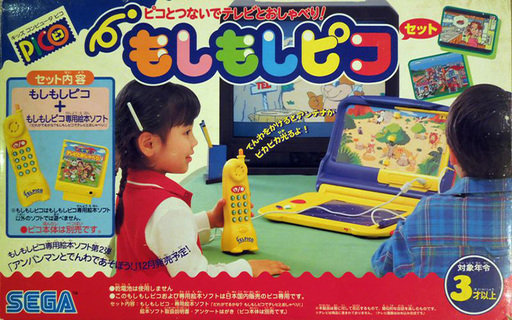
Play Moshi Moshi Pico - Dare ga Deru kana Moshi Moshi Pico de TV to Oshaberi! (Japan edition) Online
Moshi Moshi Pico - Dare ga Deru kana Moshi Moshi Pico de TV to Oshaberi!
Play Moshi Moshi Pico - Dare ga Deru kana Moshi Moshi Pico de TV to Oshaberi! online. Make pretend calls with Moshi Moshi Pico.
Browser play
Sega Pico — EmulatorJS controls
Default Player 1 keyboard mapping. Change keys in Controller Settings.
| Console button | Keyboard |
|---|---|
| ↑ / ↓ / ← / → | ↑ / ↓ / ← / → |
| Red button | X |
| Pen button | Z |
| Pen on pad | A |
| Pen on book | S |
| Pen up / down | Enter |
| Previous / next page | Q / E |
Open Controller Settings to configure your keyboard or gamepad. Touch controls are available on mobile.
Use the direction keys to move the pen after selecting pad or book mode. Toggle pen up/down to draw or select; use the page buttons to turn Storyware pages.
How to Play Moshi Moshi Pico - Dare ga Deru kana Moshi Moshi Pico de TV to Oshaberi!
Quick start
Use the Moshi Moshi Pico phone or an available emulator mapping. Start a call activity and wait for the spoken prompt before responding.
Controls
Use the Moshi Moshi Pico telephone controls. Listen to the spoken cue, then press the phone key or answer control requested by the activity. Follow the displayed cues for scene choices; computer key assignments depend on the emulator.
Moshi Moshi Pico - Dare ga Deru kana Moshi Moshi Pico de TV to Oshaberi! — About this game
Moshi Moshi Pico uses a telephone-themed accessory to make pretend conversations part of picture-book play. Listen to the character on screen and respond to the prompt using the phone controls. The central idea is discovering who answers and taking turns in a short exchange, giving the telephone a purpose within the scene. Wait for the spoken cue before entering the next response. The original accessory is part of the design, so its telephone interaction should be distinguished from ordinary pen-only Pico activities.
Moshi Moshi Pico - Dare ga Deru kana Moshi Moshi Pico de TV to Oshaberi! Game manuals
Cheats
No cheats have been added for this edition.
Player verification and sources
Browser play was reviewed before this edition was published in the catalogue. The date below is the catalogue publication date, not the game’s original release date.
- Browser test and catalogue publication date
- Browsers and devices
- PC: Chrome, Edge and Firefox. Mobile: Chrome on Android and Safari on iPhone and iPad.
- Player engine and core
- EmulatorJS 4.3.0-pre · picodrive
- Tested by
- rwEmulator
Sources and editorial basis
rwEmulator reviews edition metadata, release information, game manuals and first-hand browser-play notes. Available manuals are linked below; the editorial policy explains how facts are checked and corrections are handled.