More browsing paths
Play Shanghai Pocket (SGB Enhanced · Japan edition · Japanese) Online
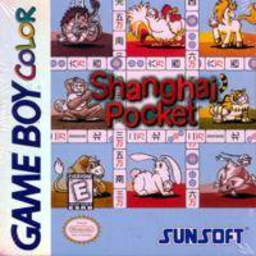
Shanghai Pocket
Play Shanghai Pocket online on GBC. Shanghai Pocket turns stacked mahjong tiles into a matching puzzle for GB and GBC.
Browser play
Game Boy Color (GBC) — EmulatorJS controls
Default Player 1 keyboard mapping. Change keys in Controller Settings.
| Console button | Keyboard |
|---|---|
| ↑ / ↓ / ← / → | ↑ / ↓ / ← / → |
| A / B | Z / X |
| START / SELECT | Enter / V |
Open Controller Settings to configure your keyboard or gamepad. Touch controls are available on mobile.
How to Play Shanghai Pocket
Quick start
Press START, choose Shanghai and select an animal layout with A. Find two matching tiles with no tile on top and a free left or right side, then select both with A. B cancels a mistaken choice. Use SELECT for Help or Back 1 Move if you get stuck, and aim to remove the entire layout before time runs out.
Controls
The D-pad moves the cursor. A selects a tile or confirms; B cancels the selected tile or returns from a menu. In Shanghai, SELECT opens the help menu; choose an entry with the D-pad and confirm with A or START. SELECT on stage selection opens configuration.
Shanghai Pocket — About this game
Removing the first available pair is not always the best move: compare what each choice uncovers and avoid leaving matching tiles buried. Seasons match other seasons and flowers match other flowers. The Shanghai menu offers a hint, undo and restart, so a blocked arrangement can become a chance to rethink the route. Tile designs and the timer can be changed in configuration to make the board easier to read or adjust the challenge.
Shanghai Pocket Game manuals
Cheats
No cheats have been added for this edition.
Player verification and sources
Browser play was reviewed before this edition was published in the catalogue. The date below is the catalogue publication date, not the game’s original release date.
- Browser test and catalogue publication date
- Browsers and devices
- PC: Chrome, Edge and Firefox. Mobile: Chrome on Android and Safari on iPhone and iPad.
- Player engine and core
- EmulatorJS 4.3.0-pre · gb
- Tested by
- rwEmulator
Sources and editorial basis
rwEmulator reviews edition metadata, release information, game manuals and first-hand browser-play notes. Available manuals are linked below; the editorial policy explains how facts are checked and corrections are handled.