More browsing paths
Play Stellar Wars (Aftermarket / Homebrew · World edition · English) Online
Stellar Wars
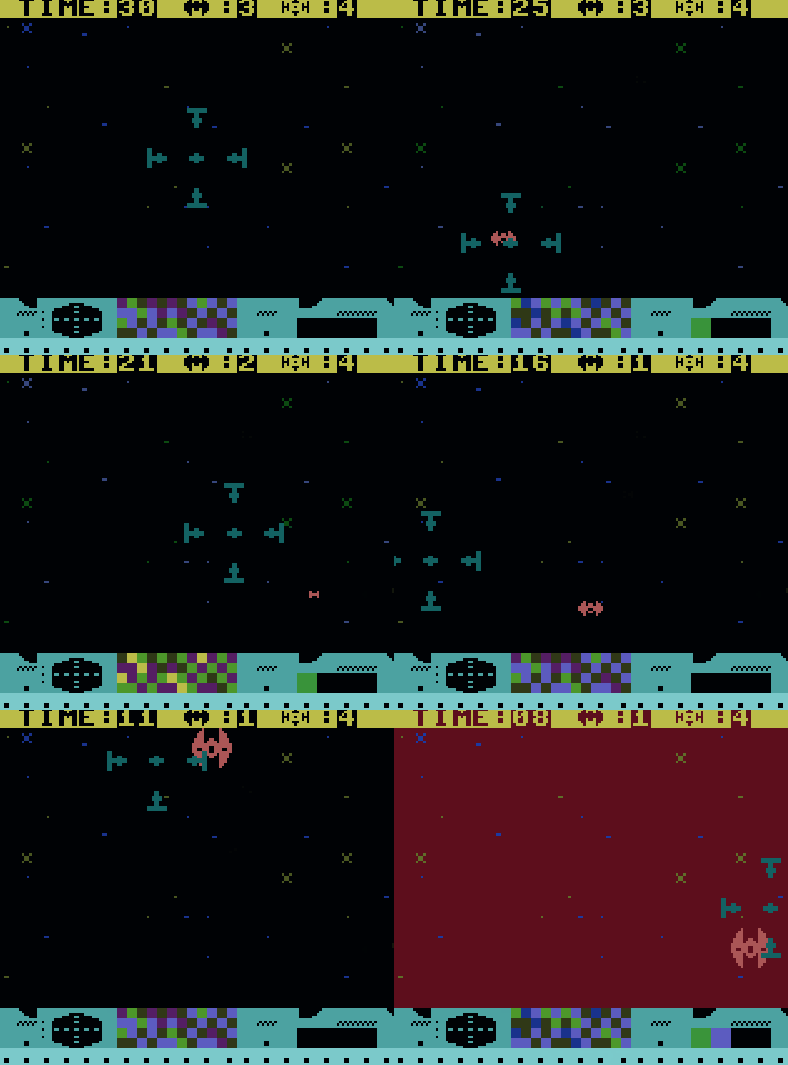
Play Stellar Wars online on Game Boy Color. Defend your space field from incoming stellar fighters in Stellar Wars. Aim the twin lasers, manage their heat and keep attackers from entering the defended area, where they can disable your controls for a few important seconds.
Browser play
Game Boy Color (GBC) — EmulatorJS controls
Default Player 1 keyboard mapping. Change keys in Controller Settings.
| Console button | Keyboard |
|---|---|
| ↑ / ↓ / ← / → | ↑ / ↓ / ← / → |
| A / B | Z / X |
| START / SELECT | Enter / V |
Open Controller Settings to configure your keyboard or gamepad. Touch controls are available on mobile.
How to Play Stellar Wars
Quick start
Start a run, move with the D-pad and try brief A or B fire. Watch the approach path and allow the lasers to cool between bursts.
Controls
D-pad moves. A or B fires the twin lasers. Avoid overheating and stop fighters before they enter your space field and briefly disable the controls.
Stellar Wars — About this game
Begin with short firing bursts and observe how approaching fighters cross the screen. Shooting continuously can overheat the lasers, while an enemy entering your field can interrupt control. Learn a steady pattern of repositioning, aimed fire and cooling before trying to chase every target at once.
Cheats
No cheats have been added for this edition.
Player verification and sources
Browser play was reviewed before this edition was published in the catalogue. The date below is the catalogue publication date, not the game’s original release date.
- Browser test and catalogue publication date
- Browsers and devices
- PC: Chrome, Edge and Firefox. Mobile: Chrome on Android and Safari on iPhone and iPad.
- Player engine and core
- EmulatorJS 4.3.0-pre · gb
- Tested by
- rwEmulator
Sources and editorial basis
rwEmulator reviews edition metadata, release information, game manuals and first-hand browser-play notes. Available manuals are linked below; the editorial policy explains how facts are checked and corrections are handled.