More browsing paths
Play TOEIC DS - Haru 10-bun Yakjeomgeukbok +200 (South Korea edition) Online
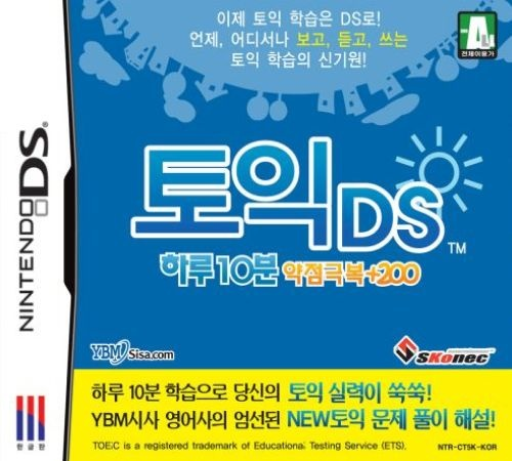
TOEIC DS - Haru 10-bun Yakjeomgeukbok +200
Play TOEIC DS - Haru 10-bun Yakjeomgeukbok +200 online. Practise TOEIC-style English in the Korean DS release with reading, listening and writing tasks supervised by YBM.
Browser play
Nintendo DS (NDS) — EmulatorJS controls
Default Player 1 keyboard mapping. Change keys in Controller Settings.
| Console button | Keyboard |
|---|---|
| ↑ / ↓ / ← / → | ↑ / ↓ / ← / → |
| A / B / X / Y | Z / X / A / S |
| L / R | Q / E |
| START / SELECT | Enter / V |
| Microphone | Not assigned |
Open Controller Settings to configure your keyboard or gamepad. Touch controls are available on mobile.
How to Play TOEIC DS - Haru 10-bun Yakjeomgeukbok +200
Quick start
Run a level check, choose a suitable practice part and listen or read before answering. Make a note if needed, check the explanation and revisit saved mistakes. Try a mock test after practising the weak area.
Controls
Use touch menus and the displayed answer fields. Write or erase notes on the touch screen when studying, keeping them separate from the submitted answer. Use audio playback for listening prompts and confirm your chosen response through the shown control.
TOEIC DS - Haru 10-bun Yakjeomgeukbok +200 — About this game
Practise TOEIC-style English in the Korean DS release with reading, listening and writing tasks supervised by YBM. Questions run from choosing the sentence that describes a picture to reading a passage and answering about it. Wrong answers are saved for focused review, and touch-screen notes let you work through a sentence while studying or reading an explanation. Begin with a level check, pick a small weak area and revisit the saved errors before a mock test. Daily graphs record the practice; the title’s +200 is not a guaranteed score increase.
TOEIC DS - Haru 10-bun Yakjeomgeukbok +200 Game manuals
Cheats
No cheats have been added for this edition.
Player verification and sources
Browser play was reviewed before this edition was published in the catalogue. The date below is the catalogue publication date, not the game’s original release date.
- Browser test and catalogue publication date
- Browsers and devices
- PC: Chrome, Edge and Firefox. Mobile: Chrome on Android and Safari on iPhone and iPad.
- Player engine and core
- EmulatorJS 4.3.0-pre · nds
- Tested by
- rwEmulator
Sources and editorial basis
rwEmulator reviews edition metadata, release information, game manuals and first-hand browser-play notes. Available manuals are linked below; the editorial policy explains how facts are checked and corrections are handled.