More browsing paths
Play Toonsylvania (Europe edition · English / French / German / Spanish / Italian / Dutch) Online
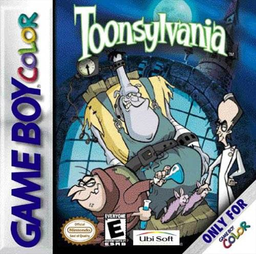
Toonsylvania
Play Toonsylvania online on GBC. Guide Igor, gather invention pieces and recover Phil’s missing body parts.
Browser play
Game Boy Color (GBC) — EmulatorJS controls
Default Player 1 keyboard mapping. Change keys in Controller Settings.
| Console button | Keyboard |
|---|---|
| ↑ / ↓ / ← / → | ↑ / ↓ / ← / → |
| A / B | Z / X |
| START / SELECT | Enter / V |
Open Controller Settings to configure your keyboard or gamepad. Touch controls are available on mobile.
How to Play Toonsylvania
Quick start
Begin Igor’s adventure and explore the first route for quest objects. A jumps, B punches and Left/Right moves. Double-tap a direction to run, or hold Down with a direction to crawl. Collect skull ammunition and watch both life and the objects needed for the puzzle machine.
Controls
Left/Right walks; double-tap to run. Down+Left/Right crawls, Up looks up and Down looks down. A jumps and confirms menus. B punches, throws a skull or rolls while running. In the inventory, choose with the directional pad and select with A or B.
Toonsylvania — About this game
Igor begins without inventions. Collect quest objects and place a world’s nine pieces correctly in Doctor Vic’s puzzle machine to rebuild an invention. The inventory shows inventions and recovered body parts, while the world map marks where parts still remain. Skulls supply ammunition, so decide when to throw one and when a close punch or running roll is enough.
Toonsylvania Game manuals
Cheats
No cheats have been added for this edition.
Player verification and sources
Browser play was reviewed before this edition was published in the catalogue. The date below is the catalogue publication date, not the game’s original release date.
- Browser test and catalogue publication date
- Browsers and devices
- PC: Chrome, Edge and Firefox. Mobile: Chrome on Android and Safari on iPhone and iPad.
- Player engine and core
- EmulatorJS 4.3.0-pre · gb
- Tested by
- rwEmulator
Sources and editorial basis
rwEmulator reviews edition metadata, release information, game manuals and first-hand browser-play notes. Available manuals are linked below; the editorial policy explains how facts are checked and corrections are handled.