More browsing paths
Play Top Gun - Fire Storm (US_EU edition · English / French / German / Spanish / Italian / Dutch) Online
Top Gun - Fire Storm
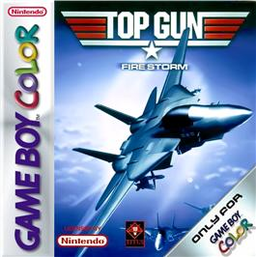
Play Top Gun - Fire Storm online on Game Boy Color. Fly combat missions in Top Gun: Fire Storm, watching threats and the route while lining up targets. A clear firing opportunity is useful only if the aircraft can survive the next part of the mission.
Browser play
Game Boy Color (GBC) — EmulatorJS controls
Default Player 1 keyboard mapping. Change keys in Controller Settings.
| Console button | Keyboard |
|---|---|
| ↑ / ↓ / ← / → | ↑ / ↓ / ← / → |
| A / B | Z / X |
| START / SELECT | Enter / V |
Open Controller Settings to configure your keyboard or gamepad. Touch controls are available on mobile.
How to Play Top Gun - Fire Storm
Quick start
Choose a mission, read its briefing and practise flying in the opening area. Test the displayed attack controls before approaching the first target.
Controls
Use the D-pad for aircraft movement and menu selection, A to confirm menus and B to cancel where offered. Follow the mission's control guide for firing and other weapons; check the target and path before attacking.
Top Gun - Fire Storm — About this game
Begin by learning aircraft movement and the current objective. Approach one target, make a controlled attack and keep room to change direction afterward. If a run fails, compare the route and enemy positions before trying the same approach again.
Cheats
No cheats have been added for this edition.
Player verification and sources
Browser play was reviewed before this edition was published in the catalogue. The date below is the catalogue publication date, not the game’s original release date.
- Browser test and catalogue publication date
- Browsers and devices
- PC: Chrome, Edge and Firefox. Mobile: Chrome on Android and Safari on iPhone and iPad.
- Player engine and core
- EmulatorJS 4.3.0-pre · gb
- Tested by
- rwEmulator
Sources and editorial basis
rwEmulator reviews edition metadata, release information, game manuals and first-hand browser-play notes. Available manuals are linked below; the editorial policy explains how facts are checked and corrections are handled.