More browsing paths
Play Toy Story Racer (US_EU edition · English) Online
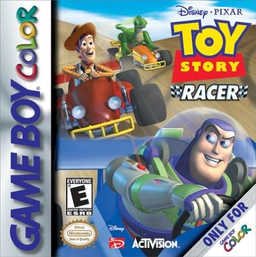
Toy Story Racer
Play Toy Story Racer online on GBC. Race the toys, master the corners and continue tournaments with passwords.
Browser play
Game Boy Color (GBC) — EmulatorJS controls
Default Player 1 keyboard mapping. Change keys in Controller Settings.
| Console button | Keyboard |
|---|---|
| ↑ / ↓ / ← / → | ↑ / ↓ / ← / → |
| A / B | Z / X |
| START / SELECT | Enter / V |
Open Controller Settings to configure your keyboard or gamepad. Touch controls are available on mobile.
How to Play Toy Story Racer
Quick start
Press START at the title and select Quick Race. Choose a track, then a character. Hold A to accelerate, use B before tight corners and steer with the directional pad. When you try Tournament, record each six-picture password before leaving.
Controls
The directional pad steers, A accelerates and B brakes. START pauses the race. Use the directional pad and A in menus; Restore accepts the picture password saved after a tournament race.
Toy Story Racer — About this game
Quick Race lets you choose a track and then a character. Tournament starts with a character choice and continues through several courses against toy opponents. After a completed tournament race, a six-picture password records your progress and options. Keep it for Restore, and use the rankings and race display to judge your improvement.
Toy Story Racer Game manuals
Cheats
No cheats have been added for this edition.
Player verification and sources
Browser play was reviewed before this edition was published in the catalogue. The date below is the catalogue publication date, not the game’s original release date.
- Browser test and catalogue publication date
- Browsers and devices
- PC: Chrome, Edge and Firefox. Mobile: Chrome on Android and Safari on iPhone and iPad.
- Player engine and core
- EmulatorJS 4.3.0-pre · gb
- Tested by
- rwEmulator
Sources and editorial basis
rwEmulator reviews edition metadata, release information, game manuals and first-hand browser-play notes. Available manuals are linked below; the editorial policy explains how facts are checked and corrections are handled.