More browsing paths
Play Trick Boarder (US edition · English) Online
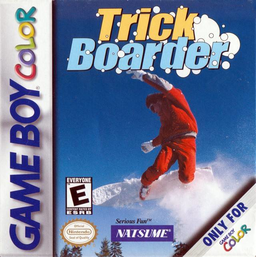
Trick Boarder
Play Trick Boarder online on GBC. Ride downhill, clear obstacles and practise controlled aerial tricks.
Browser play
Game Boy Color (GBC) — EmulatorJS controls
Default Player 1 keyboard mapping. Change keys in Controller Settings.
| Console button | Keyboard |
|---|---|
| ↑ / ↓ / ← / → | ↑ / ↓ / ← / → |
| A / B | Z / X |
| START / SELECT | Enter / V |
Open Controller Settings to configure your keyboard or gamepad. Touch controls are available on mobile.
How to Play Trick Boarder
Quick start
Choose a rider and an available course. Use Left/Right to line up with the slope, press A to jump and B for a trick in the air. On the first run concentrate on staying on the route; add tricks only after you know the landing space.
Controls
Left/Right steers the board, A jumps and B performs a trick in the air. START pauses. Use the directional pad and A to make menu choices, and B to return.
Trick Boarder — About this game
The downhill courses combine racing lines with chances to show off in the air. Learn where the slope turns before trying a trick, then straighten the board for landing and continue toward the finish. Different riders give another reason to revisit a familiar route and practise a smoother sequence of steering, take-off and recovery.
Cheats
No cheats have been added for this edition.
Player verification and sources
Browser play was reviewed before this edition was published in the catalogue. The date below is the catalogue publication date, not the game’s original release date.
- Browser test and catalogue publication date
- Browsers and devices
- PC: Chrome, Edge and Firefox. Mobile: Chrome on Android and Safari on iPhone and iPad.
- Player engine and core
- EmulatorJS 4.3.0-pre · gb
- Tested by
- rwEmulator
Sources and editorial basis
rwEmulator reviews edition metadata, release information, game manuals and first-hand browser-play notes. Available manuals are linked below; the editorial policy explains how facts are checked and corrections are handled.