More browsing paths
Play Tyco RC - Racin' Ratz (US edition · English) Online
Tyco RC - Racin' Ratz
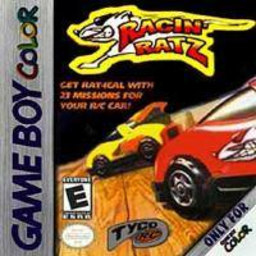
Play Tyco RC - Racin' Ratz online on GBC. Tyco RC: Racin’ Ratz makes a small remote-control car the hero of room-sized exploration puzzles.
Browser play
Game Boy Color (GBC) — EmulatorJS controls
Default Player 1 keyboard mapping. Change keys in Controller Settings.
| Console button | Keyboard |
|---|---|
| ↑ / ↓ / ← / → | ↑ / ↓ / ← / → |
| A / B | Z / X |
| START / SELECT | Enter / V |
Open Controller Settings to configure your keyboard or gamepad. Touch controls are available on mobile.
How to Play Tyco RC - Racin' Ratz
Quick start
Explore the first room and learn how the car turns. Inspect a nearby obstacle, collect a suitable powerup and assign it to a slot. Use the camera to plan a short route, then activate the tool when needed.
Controls
D-pad drives the car. A uses or assigns the right-hand item slot; B uses or assigns the left-hand slot. START opens the menu. SELECT lets the camera roam around the room.
Tyco RC - Racin' Ratz — About this game
Look around before spending a temporary powerup. A wall-climbing route, narrow gap or raised object may need a different tool, and filling both slots without a plan can leave the next obstacle unsolved. Use the roaming camera to understand the room, then return to the car with a sequence in mind. Start with nearby reachable items before pursuing a distant target.
Cheats
No cheats have been added for this edition.
Player verification and sources
Browser play was reviewed before this edition was published in the catalogue. The date below is the catalogue publication date, not the game’s original release date.
- Browser test and catalogue publication date
- Browsers and devices
- PC: Chrome, Edge and Firefox. Mobile: Chrome on Android and Safari on iPhone and iPad.
- Player engine and core
- EmulatorJS 4.3.0-pre · gb
- Tested by
- rwEmulator
Sources and editorial basis
rwEmulator reviews edition metadata, release information, game manuals and first-hand browser-play notes. Available manuals are linked below; the editorial policy explains how facts are checked and corrections are handled.