More browsing paths
Play Ultimate Puzzle Games (US edition · English) Online
Ultimate Puzzle Games
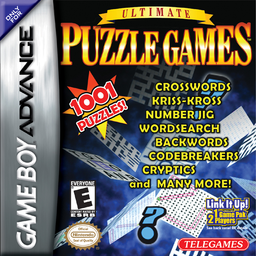
Play Ultimate Puzzle Games online on GBA. Work through 1,001 crosswords, word searches, number jigs and other word puzzles with clues, saves and built-in help.
Browser play
Game Boy Advance (GBA) — EmulatorJS controls
Default Player 1 keyboard mapping. Change keys in Controller Settings.
| Console button | Keyboard |
|---|---|
| ↑ / ↓ / ← / → | ↑ / ↓ / ← / → |
| A / B | Z / X |
| L / R | Q / E |
| START / SELECT | Enter / V |
Open Controller Settings to configure your keyboard or gamepad. Touch controls are available on mobile.
How to Play Ultimate Puzzle Games
Quick start
At the Main Menu, press Control Pad Left/Right until Crosswords is inside the magnifying glass, then press A. On the Puzzle Selection Menu, use Up/Down to highlight Crossword 1 and press A; the Saved and Done columns show whether a puzzle is in progress or complete. On the grid, press Left/Right to choose an answer position, Up/Down to pan around the larger puzzle, and A to open that word's clue. Move around the on-screen alphabet, enter your proposed letters, then select done to place the answer on the grid. Incorrect entries are allowed, so compare crossing letters before committing. If you get stuck, press START and choose Game > Solve Puzzle, or open Options > How To Play for the puzzle's own instructions; use Options > Save to keep progress in one of the two save slots.
Controls
Main Menu: Control Pad Left/Right cycles through puzzle types and A selects the type in the magnifying glass. Puzzle list: Up/Down scrolls through puzzles, A opens the highlighted puzzle, and B goes back. Crossword grid: Left/Right selects an answer position, Up/Down pans over the full grid, A opens the selected clue, and B returns from the clue/letter screen to the grid. On the clue screen, use the Control Pad to highlight letters or done and A to enter/confirm them. START opens the in-puzzle Game/Options menu; use the Control Pad to choose a tab or command, A to select, B to return, and START again to exit the menu. Game offers Solve Puzzle, Reset Puzzle, and New Puzzle; Options offers Quit, Save, Music, SFX, Background, and How To Play. No universal L, R, or SELECT action is documented for puzzle play, so none is claimed.
Ultimate Puzzle Games Game manuals
Cheats
No cheats have been added for this edition.
Player verification and sources
Browser play was reviewed before this edition was published in the catalogue. The date below is the catalogue publication date, not the game’s original release date.
- Browser test and catalogue publication date
- Browsers and devices
- PC: Chrome, Edge and Firefox. Mobile: Chrome on Android and Safari on iPhone and iPad.
- Player engine and core
- EmulatorJS 4.3.0-pre · gba
- Tested by
- rwEmulator
Sources and editorial basis
rwEmulator reviews edition metadata, release information, game manuals and first-hand browser-play notes. Available manuals are linked below; the editorial policy explains how facts are checked and corrections are handled.