More browsing paths
Play Naminori Yarou! (US edition · English) Online
Ultimate Surfing
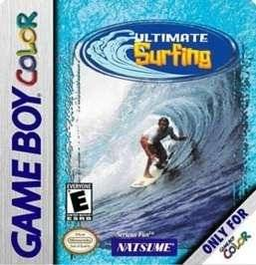
Play Naminori Yarou! online on GBC. Ride waves and work on a surfer’s turns, jumps and trick timing. Also grouped here as Ultimate Surfing, the handheld game asks you to stay with the moving wave and return to a controlled line after each maneuver.
Browser play
Game Boy Color (GBC) — EmulatorJS controls
Default Player 1 keyboard mapping. Change keys in Controller Settings.
| Console button | Keyboard |
|---|---|
| ↑ / ↓ / ← / → | ↑ / ↓ / ← / → |
| A / B | Z / X |
| START / SELECT | Enter / V |
Open Controller Settings to configure your keyboard or gamepad. Touch controls are available on mobile.
How to Play Naminori Yarou!
Quick start
Choose a surfer and an easy session. Use Left/Right to adjust your line, then try the A/B board actions one at a time and focus on landing back on the wave.
Controls
The D-pad steers and selects options. A/B perform the main board actions according to the current riding situation; menu A confirms and B returns. START pauses. Keep a stable line before chaining tricks.
Naminori Yarou! — About this game
Naminori Yarou! for Game Boy Color. Keep enough room to turn back toward the useful part of the wave. A trick is valuable only if you can land and continue riding, so learn one clean movement before trying a longer sequence. Watch the wave shape instead of steering at random.
Cheats
No cheats have been added for this edition.
Player verification and sources
Browser play was reviewed before this edition was published in the catalogue. The date below is the catalogue publication date, not the game’s original release date.
- Browser test and catalogue publication date
- Browsers and devices
- PC: Chrome, Edge and Firefox. Mobile: Chrome on Android and Safari on iPhone and iPad.
- Player engine and core
- EmulatorJS 4.3.0-pre · gb
- Tested by
- rwEmulator
Sources and editorial basis
rwEmulator reviews edition metadata, release information, game manuals and first-hand browser-play notes. Available manuals are linked below; the editorial policy explains how facts are checked and corrections are handled.