More browsing paths
Play Warriors of Might and Magic (US edition · English / French / German) Online
Warriors of Might and Magic
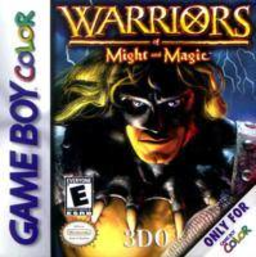
Play Warriors of Might and Magic online on GBC. Warriors of Might and Magic sends Alleron out of a dungeon after Ragloth’s army attacks his stronghold.
Browser play
Game Boy Color (GBC) — EmulatorJS controls
Default Player 1 keyboard mapping. Change keys in Controller Settings.
| Console button | Keyboard |
|---|---|
| ↑ / ↓ / ← / → | ↑ / ↓ / ← / → |
| A / B | Z / X |
| START / SELECT | Enter / V |
Open Controller Settings to configure your keyboard or gamepad. Touch controls are available on mobile.
How to Play Warriors of Might and Magic
Quick start
Choose a language and begin the escape. Find a weapon, equip it in inventory and try jumping on safe ground. Read the action icons, then explore toward the stronghold while checking health and supplies.
Controls
D-pad moves and selects. A jumps or performs the displayed action and confirms menus. B uses the weapon and backs out of inventory. START opens inventory for weapons, spell scrolls and saving.
Warriors of Might and Magic — About this game
Arm yourself soon after leaving the cell and practice a safe jump before crossing a dangerous gap. Inspect buildings and talk to people for clues and supplies. The inventory holds equipment and spell choices as well as saving; loading returns Alleron to the beginning of the saved level. Watch the attack bar instead of striking blindly, and keep useful magic for situations where it changes the fight.
Warriors of Might and Magic Game manuals
Cheats
No cheats have been added for this edition.
Player verification and sources
Browser play was reviewed before this edition was published in the catalogue. The date below is the catalogue publication date, not the game’s original release date.
- Browser test and catalogue publication date
- Browsers and devices
- PC: Chrome, Edge and Firefox. Mobile: Chrome on Android and Safari on iPhone and iPad.
- Player engine and core
- EmulatorJS 4.3.0-pre · gb
- Tested by
- rwEmulator
Sources and editorial basis
rwEmulator reviews edition metadata, release information, game manuals and first-hand browser-play notes. Available manuals are linked below; the editorial policy explains how facts are checked and corrections are handled.