More browsing paths
Play Xtreme Wheels (Europe edition · English) Online
Xtreme Wheels
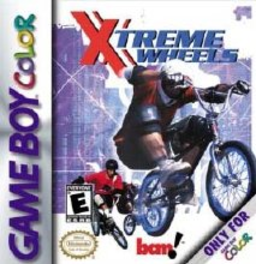
Play Xtreme Wheels online on GBC. Ride a BMX bike across side-view courses, combining speed with balance over bumps and jumps. A fast approach helps only when the bike can land under control, so course reading matters as much as pushing toward the finish.
Browser play
Game Boy Color (GBC) — EmulatorJS controls
Default Player 1 keyboard mapping. Change keys in Controller Settings.
| Console button | Keyboard |
|---|---|
| ↑ / ↓ / ← / → | ↑ / ↓ / ← / → |
| A / B | Z / X |
| START / SELECT | Enter / V |
Open Controller Settings to configure your keyboard or gamepad. Touch controls are available on mobile.
How to Play Xtreme Wheels
Quick start
Choose an opening course and ride slowly enough to read its hills. Try a short jump, straighten the bike for landing and repeat the same section before attempting a faster run.
Controls
The D-pad selects options and adjusts riding direction or balance. A/B provide the main riding actions indicated by the game. Menu A confirms and B returns; START pauses. Practice balance before adding tricks.
Xtreme Wheels — About this game
Xtreme Wheels for Game Boy Color. Look ahead for the shape of the next slope and adjust the bike before touching down. Complete a stable run first, then add speed or airborne style. A poor landing can cost more time than a cautious approach.
Cheats
No cheats have been added for this edition.
Player verification and sources
Browser play was reviewed before this edition was published in the catalogue. The date below is the catalogue publication date, not the game’s original release date.
- Browser test and catalogue publication date
- Browsers and devices
- PC: Chrome, Edge and Firefox. Mobile: Chrome on Android and Safari on iPhone and iPad.
- Player engine and core
- EmulatorJS 4.3.0-pre · gb
- Tested by
- rwEmulator
Sources and editorial basis
rwEmulator reviews edition metadata, release information, game manuals and first-hand browser-play notes. Available manuals are linked below; the editorial policy explains how facts are checked and corrections are handled.