More browsing paths
Play Yars' Revenge (GB Compatible · US_EU edition · English) Online
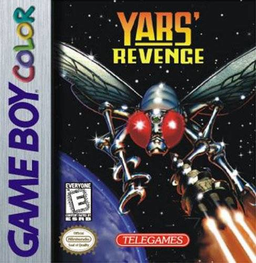
Yars' Revenge
Play Yars' Revenge online on GBC. Breach the Qotile’s shield, charge the Zorlon Cannon and line up the decisive shot. You can shoot or eat shield cells, but the cannon fires across your own position, so a successful attack also requires getting out of its path.
Browser play
Game Boy Color (GBC) — EmulatorJS controls
Default Player 1 keyboard mapping. Change keys in Controller Settings.
| Console button | Keyboard |
|---|---|
| ↑ / ↓ / ← / → | ↑ / ↓ / ← / → |
| A / B | Z / X |
| START / SELECT | Enter / V |
Open Controller Settings to configure your keyboard or gamepad. Touch controls are available on mobile.
How to Play Yars' Revenge
Quick start
Start a game, use B to open a shield gap and touch cells to collect energy. When flashing, visit the left edge to load the cannon, align with the base, press A and move clear.
Controls
The D-pad moves Yars in any direction. B fires Energy Missiles; A fires the loaded Zorlon Cannon. START starts, skips screens or pauses. Direct contact eats shield cells; move away from your cannon shot.
Yars' Revenge — About this game
Yars' Revenge for Game Boy Color. Eat five cells or touch the Qotile to gather cannon energy, then return to the left edge when Yars flashes. Aim, fire and move away quickly. The neutral zone blocks ordinary Destroyer Missiles but does not protect against the Swirl, and you cannot fire from it.
Yars' Revenge Game manuals
Cheats
No cheats have been added for this edition.
Player verification and sources
Browser play was reviewed before this edition was published in the catalogue. The date below is the catalogue publication date, not the game’s original release date.
- Browser test and catalogue publication date
- Browsers and devices
- PC: Chrome, Edge and Firefox. Mobile: Chrome on Android and Safari on iPhone and iPad.
- Player engine and core
- EmulatorJS 4.3.0-pre · gb
- Tested by
- rwEmulator
Sources and editorial basis
rwEmulator reviews edition metadata, release information, game manuals and first-hand browser-play notes. Available manuals are linked below; the editorial policy explains how facts are checked and corrections are handled.