その他の閲覧経路
サンダーゾーン (World, Rev 1)(世界版 · リビジョン 1 · 英語)をブラウザでプレイ
Thunder Zone (World, Rev 1)
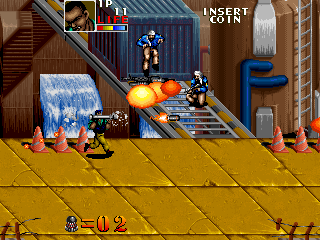
サンダーゾーン (World, Rev 1)をオンラインでプレイ。Collect heavy weapons and health, use the commando’s limited special bomb and mount vehicles on the route.
ブラウザプレイ
アーケード — EmulatorJS のキー割り当て
プレイヤー1の初期キー割り当てです。コントローラー設定で変更できます。
| 本体のボタン | キーボード |
|---|---|
| ↑ / ↓ / ← / → | ↑ / ↓ / ← / → |
| RetroPad A / B / X / Y | Z / X / A / S |
| L / R | Q / E |
| コイン投入 | V |
| START | Enter |
コントローラー設定でキーボードやゲームパッドを設定できます。モバイルではタッチ操作を利用できます。
サンダーゾーン (World, Rev 1)の遊び方
クイックスタート
- Choose a commando and learn its ordinary attack.
- Collect a new weapon and check its reach.
- Recover health when the cleared route allows.
- Preserve the special bomb for a crowded fixed-gun or vehicle approach.
操作方法
八方向控制移动;A射击,B使用炸弹,也用于离开载具或脱离搀扶。连续向前两次可加速移动;体力每降低一档,移动速度会下降一级。
サンダーゾーン (World, Rev 1) — ゲーム紹介
サンダーゾーン (World, Rev 1) gives its commandos collected heavy weapons alongside a limited special bomb unique to each soldier. Enemy infantry, vehicles and fixed guns fill the route, with health items offering a reason to search the cleared ground. Some sections move into a vehicle instead of continuing entirely on foot. Learn the chosen commando’s special attack before taking a flamethrower or launcher, then check the next approach for a fixed gun that cannot be avoided simply by defeating the nearest soldier. The second-stage scenery varies by regional edition, so the opening weapon plan matters more than memorising one landscape.
チート
無限エネルギー PL1
1 "开启", 0, 0x3F8007, 0x0F無限ボム PL1
1 "开启", 0, 0x3F802E, 0x09キャラクター・インビネーション PL1
1 "开启", 0, 0x3F8003, 0x03, 0, 0x3F8021, 0x02無限エネルギー PL2
1 "开启", 0, 0x3F8087, 0x0F無限ボム PL2
1 "开启", 0, 0x3F80AE, 0x09キャラクターの確率 PL2 (それは2番目のインセンティブレベルに一時的に閉鎖されます)
1 "开启", 0, 0x3F8083, 0x03, 0, 0x3F80A1, 0x02プレイヤーの動作確認と情報源
ブラウザプレイは、この版をカタログに公開する前に確認しています。下の日付はカタログ公開日であり、ゲーム本来の発売日ではありません。
- ブラウザテスト・カタログ公開日
- ブラウザと端末
- PC:Chrome、Edge、Firefox。モバイル:Android版Chrome、iPhone・iPad版Safari。
- プレイヤーエンジンとコア
- EmulatorJS 4.3.0-pre · arcade
- テスト担当
- rwEmulator
情報源と編集方針
rwEmulatorは版のメタデータ、発売情報、説明書、ブラウザでの実機確認メモを確認します。利用できる説明書は下に掲載し、事実確認と訂正の方法は編集方針で説明します。