다른 탐색 경로
너클 헤드 (World)(세계판 · 영어) 브라우저 플레이
Knuckle Heads (World)
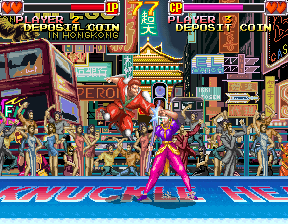
온라인에서 너클 헤드 (World) 플레이하기. Choose six weapon fighters and face duels, two-opponent encounters or crowded multiplayer arenas.
브라우저 플레이
아케이드 — EmulatorJS 키 매핑
플레이어 1의 기본 키보드 매핑입니다. 컨트롤러 설정에서 키를 변경할 수 있습니다.
| 콘솔 버튼 | 키보드 |
|---|---|
| ↑ / ↓ / ← / → | ↑ / ↓ / ← / → |
| RetroPad A / B / X / Y | Z / X / A / S |
| L / R | Q / E |
| 동전 넣기 | V |
| START | Enter |
컨트롤러 설정에서 키보드나 게임패드를 설정할 수 있습니다. 모바일에서는 터치 조작을 사용할 수 있습니다.
너클 헤드 (World) 플레이 방법
빠른 시작
- Choose a fighter and learn the weapon’s reach.
- Practise the separate Jump action.
- Keep a safe landing space before entering another attack.
- Reposition when a second opponent joins the encounter.
조작 방법
8方向レバーと、上段攻撃、下段攻撃、ジャンプの三つのボタンを使います。上段か下段を押し続け、離すと気合い攻撃になります。必殺技は方向入力の後にボタンを離して発動します。防御は相手と反対方向へ入力します。しゃがみはなく、ジャンプは専用ボタンです。
너클 헤드 (World) — 게임 소개
너클 헤드 (World) builds its fighting show around six weapon-bearing competitors and a separate jump action. A solo tournament begins with ordinary duels, then adds fights against two opponents at once before a golden version of the selected character. Each fighter’s weapon changes the useful distance for a safe strike. Multiplayer can put more competitors into the same arena, making the threat behind the current target important. Learn one weapon’s reach before jumping into the crowd, then reposition when another opponent approaches from the side.
너클 헤드 (World) 게임 설명서
치트
무한 시간
1 "开启", 0, 0x7E24, 0x0D, 0, 0x7E25, 0xAB스테이지 클리어
1 "开启", 0, 0x7E24, 0x00, 0, 0x7E25, 0x00무한 에너지 PL1
1 "开启", 0, 0x11F5, 0x63무한 에너지 PL2
1 "开启", 0, 0x14AF, 0x63무한 에너지 PL1
1 "开启", 0, 0x2251, 0x63무한 에너지 PL2
1 "开启", 0, 0x14AF, 0x63무한 에너지 PL3
1 "开启", 0, 0x11F5, 0x63무한 에너지 PL4
1 "开启", 0, 0x1CDD, 0x63플레이어 확인 및 출처
브라우저 플레이는 이 버전을 카탈로그에 공개하기 전에 확인했습니다. 아래 날짜는 카탈로그 공개일이며 게임의 원래 출시일이 아닙니다.
- 브라우저 테스트 및 카탈로그 공개일
- 브라우저 및 기기
- PC: Chrome, Edge, Firefox. 모바일: Android Chrome, iPhone 및 iPad Safari.
- 플레이어 엔진 및 코어
- EmulatorJS 4.3.0-pre · arcade
- 테스트 담당
- rwEmulator
출처 및 편집 근거
rwEmulator는 버전 메타데이터, 출시 정보, 설명서와 브라우저 테스트 기록을 검토합니다. 이용 가능한 설명서는 아래에 연결하며 사실 확인과 정정 절차는 편집 정책에서 설명합니다.