More browsing paths
Play Forgotten Worlds (Japan) (English prototype) (Japan edition · English) Online
Forgotten Worlds (Japan) (English prototype)
Play Forgotten Worlds (Japan) (English prototype) online. Defeat Bios and his servants above a devastated future Earth.
Browser play
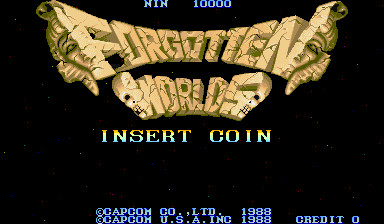
Arcade — EmulatorJS controls
Default Player 1 keyboard mapping. Change keys in Controller Settings.
| Console button | Keyboard |
|---|---|
| ↑ / ↓ / ← / → | ↑ / ↓ / ← / → |
| RetroPad A / B / X / Y | Z / X / A / S |
| L / R | Q / E |
| Insert coin | V |
| START | Enter |
Open Controller Settings to configure your keyboard or gamepad. Touch controls are available on mobile.
How to Play Forgotten Worlds (Japan) (English prototype)
Quick start
- Move with the joystick and practise turning the aim separately.
- Fire while keeping a dangerous enemy in the chosen direction.
- Collect Zenny and make a purchase before the shop timer expires.
- Reserve Megacrush for emergencies because it consumes vitality.
Controls
The joystick moves the soldier. Turn the original roll switch to aim in sixteen directions and press it to fire. Turning while firing adjusts the satellite’s aim; turning without firing also changes its position around the soldier. Rapid presses trigger the vitality-consuming Megacrush.
Forgotten Worlds (Japan) (English prototype) — About this game
A flying supersoldier battles through the Dust World with a rifle against forces serving the evil gods.
Cheats
No cheats have been added for this edition.
Player verification and sources
Browser play was reviewed before this edition was published in the catalogue. The date below is the catalogue publication date, not the game’s original release date.
- Browser test and catalogue publication date
- Browsers and devices
- PC: Chrome, Edge and Firefox. Mobile: Chrome on Android and Safari on iPhone and iPad.
- Player engine and core
- EmulatorJS 4.3.0-pre · arcade
- Tested by
- rwEmulator
Sources and editorial basis
rwEmulator reviews edition metadata, release information, game manuals and first-hand browser-play notes. Available manuals are linked below; the editorial policy explains how facts are checked and corrections are handled.