More browsing paths
Play Metal Slug Advance (Japan edition · Japanese) Online
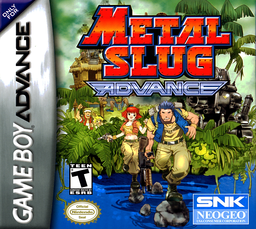
Metal Slug Advance
Play Metal Slug Advance online. A run-and-gun action game where you rescue prisoners, collect weapons, vehicles, and ability cards as you progress through intense GBA missions.
Browser play
Game Boy Advance (GBA) — EmulatorJS controls
Default Player 1 keyboard mapping. Change keys in Controller Settings.
| Console button | Keyboard |
|---|---|
| ↑ / ↓ / ← / → | ↑ / ↓ / ← / → |
| A / B | Z / X |
| L / R | Q / E |
| START / SELECT | Enter / V |
Open Controller Settings to configure your keyboard or gamepad. Touch controls are available on mobile.
How to Play Metal Slug Advance
Quick start
Select the file and character in "GAME START" and proceed to MISSION 1. Go right through the jungle, collect cards and protect the LIFE gauge while rescuing prisoners. At the starting point, kill the first soldier and shoot directly above him to rescue the hidden prisoner. After that, it's a good idea to ride the placed Metal Slug and save the grenades and cannonballs for armored weapons.
Controls
D-pad: move/aim, crouch down. A: Jump/Decision. B: Fire (knife at close range)/Cancel. R: Grenade, cannon for vehicles. L: Metasura attack, stealth function after acquiring a compatible card. While in a vehicle, press Down + A to get off. Do not use the pause menu or SELECT in START.
Metal Slug Advance Game manuals
Cheats
No cheats have been added for this edition.
Player verification and sources
Browser play was reviewed before this edition was published in the catalogue. The date below is the catalogue publication date, not the game’s original release date.
- Browser test and catalogue publication date
- Browsers and devices
- PC: Chrome, Edge and Firefox. Mobile: Chrome on Android and Safari on iPhone and iPad.
- Player engine and core
- EmulatorJS 4.3.0-pre · gba
- Tested by
- rwEmulator
Sources and editorial basis
rwEmulator reviews edition metadata, release information, game manuals and first-hand browser-play notes. Available manuals are linked below; the editorial policy explains how facts are checked and corrections are handled.